
Pick Deepswap AI if you want a quick browser tool for face swaps without installing heavy software. It supports face swaps for videos, photos, and GIFs, according to its own feature page [source: Deepswap].
TLDR: Deepswap AI is best for casual creators who want fast results and simple controls. Tools like Reface are better for phone fun, while DeepFaceLab is better for tech users who want more control. For example, if you make 20 meme clips per month, Deepswap may save time because it runs in the browser. But if privacy is your top worry, offline tools are safer because your files stay on your own machine.
Table of Contents
Quick answer: who wins?
Deepswap AI wins on ease. It is clean, simple, and made for people who do not want to learn editing. Upload a face. Upload a video or image. Click a button. Wait a bit.
Other tools can win on price, control, or privacy. That depends on what you need. A phone app is cheaper for silly clips. An advanced desktop tool gives better control. A free web tool may be fine for one photo.
Honestly, it feels like face-swap tools all promise magic. Then you upload a blurry selfie and get a wax museum version of yourself. So the real question is not “which one is perfect?” It is “which one annoys you the least?”
Feature comparison
Deepswap AI focuses on simple face swaps. It works in a browser. That is great if your laptop already sounds like a tiny jet engine. No big download. No scary setup.
- Best for: videos, GIFs, memes, quick edits.
- Skill level: beginner friendly.
- Speed: usually fast, but large videos can take longer.
- Output: often cleaner than basic free tools.
Reface is more of a mobile fun app. It is great for quick laughs. You can swap into popular clips and share them fast. It is less ideal if you want detailed control over your own longer videos.
FaceMagic is similar. It is made for quick video swaps and social posts. It works well for casual use. The app style is easy. The tradeoff is that you may run into limits unless you pay.
DeepFaceLab is the geeky option. It can make very strong results. But expect to waste time on setup, training, files, and settings. It is not “click once and done.” It is more like building a tiny movie studio in your computer.
Vidnoz, Remaker, and other web tools are good for quick image swaps. Some offer free credits. That is handy. But quality can vary a lot. One photo may look great. The next may look like your cousin wearing a rubber mask.
Pricing: simple, but not always cheap
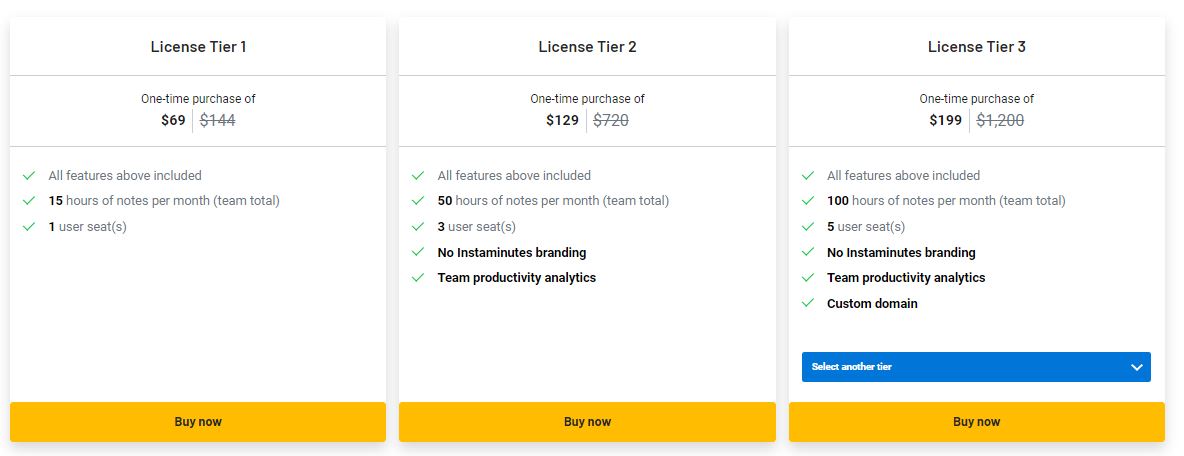
Deepswap AI pricing usually works through a paid plan or credits. The exact price can change due to promos, region, or plan type. Many users should expect a paid monthly option if they want regular video swaps.
The key thing is not just the monthly fee. It is also the credit system. A short clip may use fewer credits. A longer video may burn through them faster. That is where people get annoyed.
- Deepswap AI: better value if you make many swaps each month.
- Reface: often better for low-cost mobile fun.
- FaceMagic: good for casual video swaps, but check limits.
- DeepFaceLab: free software, but your time and hardware are the price.
- Free web tools: cheap at first, but often limited or watermarked.
If you only need one funny birthday GIF, do not overpay. Use a free or low-cost app. If you need weekly content, Deepswap AI starts to make more sense.
Privacy: the part people skip
This is the serious bit. Face-swap tools use faces. That means real identity data. So yes, privacy matters.
With Deepswap AI and most web tools, you upload files to a server. That is normal for cloud AI tools. It also means you should read the privacy policy before uploading sensitive photos. Boring? Yes. Worth it? Also yes.
Offline tools like DeepFaceLab can be safer for privacy because files stay on your machine. But there is a catch. You need a strong computer. You also need patience. A lot of it.
Mobile apps can be tricky too. They may collect usage data, device data, or uploaded media data. Some are fine. Some are vague. It drives me crazy when an app says “we may improve services” and gives almost no clear detail.
Here is a simple privacy checklist:
- Use your own face or get clear permission.
- Do not upload private photos of kids, coworkers, or strangers.
- Check deletion rules before uploading.
- Avoid sensitive content like IDs, medical images, or private videos.
- Use offline tools for personal or risky projects.
Quality: what affects the final swap?
The tool matters. But your input matters more.
Use a clear face photo. Face the camera. Avoid sunglasses. Avoid heavy shadows. Use a still frame where the face is not twisted or blurred. The AI is clever, not psychic.
For video, lighting is huge. A well-lit 10 second clip can look better than a dark 60 second clip. Short clips are also cheaper and faster in many tools.

Best use cases
- Deepswap AI: YouTube shorts, memes, GIFs, fun brand clips, quick creator edits.
- Reface: phone jokes, group chats, reaction clips.
- FaceMagic: casual social videos and fast swaps.
- DeepFaceLab: advanced editing, local control, hobby projects.
- Free web tools: one-off images and testing ideas.
Final verdict
Deepswap AI is the best middle option. It is easier than DeepFaceLab. It is more flexible than many mobile apps. It is better for regular creators than tiny free tools.
Still, it is not always the cheapest. It is also not the most private. If your project is silly and public, Deepswap AI is a strong pick. If your project is sensitive, use an offline tool or skip the upload.
Simple rule: use Deepswap AI for speed, use mobile apps for laughs, and use offline software for control and privacy.