
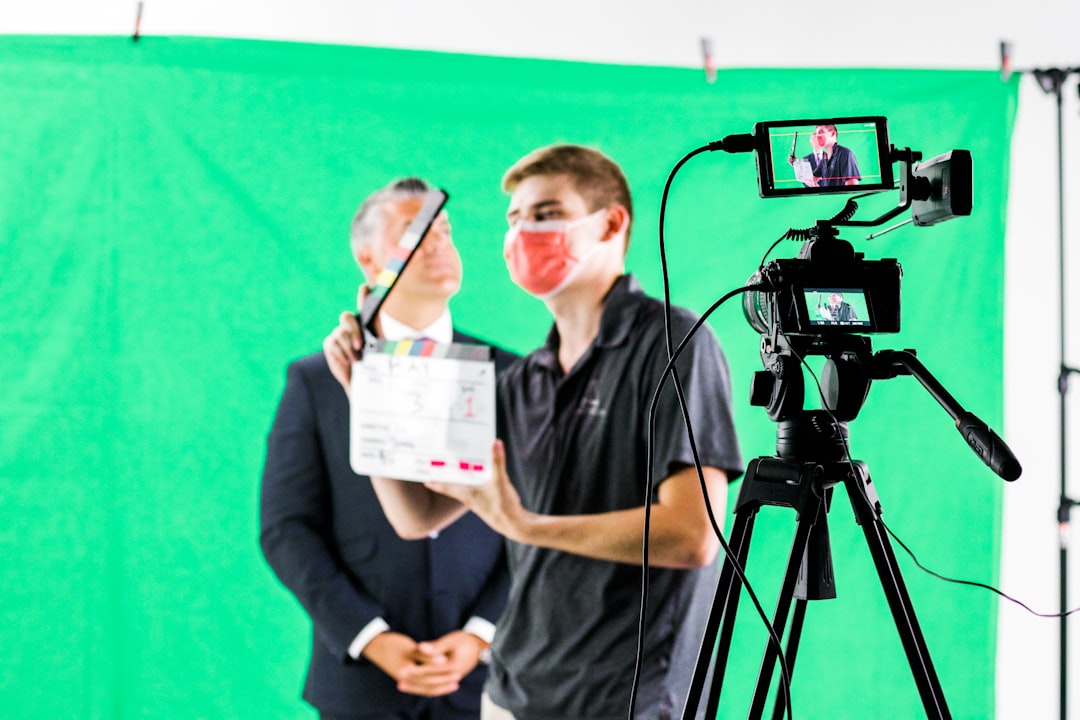
Ambient light is the existing light already present in a scene before any video lighting is added. It may come from windows, ceiling fixtures, lamps, monitors, signage, or reflected daylight. For video, it affects exposure, contrast, color, skin tone, noise, and the mood of the frame. A common office lighting range is roughly 300 to 500 lux, which gives a useful reference point when judging indoor video brightness [source: CCOHS].
TLDR: Ambient light is the background light that already exists in a room or location. A creator measures it with a lux meter, a camera’s waveform, false color, or even a calibrated phone app, then controls it with curtains, flags, dimmers, diffusion, and added key lights. For example, a trainer recording course videos in a 120 lux room may look grainy, but raising the face exposure with a soft key light and reducing window spill can cut visible noise by about 30% on many webcams. The goal is not always “more light,” but controlled light.
Table of Contents
What Ambient Light Means in Video
Ambient light is the base layer of illumination. It is the light the camera sees before a key light, fill light, or backlight is placed. In a living room, it could be warm lamps and a cool TV glow. In an office, it may be flat overhead LED panels. Outdoors, it is sunlight, skylight, reflections from buildings, and bounced light from pavement.
This light can help or hurt. Soft window light can make a face look natural. Cheap ceiling lights can create green skin tones and shadows under the eyes. Mixed light can turn one side of a face orange and the other blue. Honestly, it feels like one bad ceiling fixture can ruin an otherwise solid setup in seconds.
Ambient light matters because video cameras do not see like human eyes. A room may look fine to a person, yet appear dark, noisy, or color-shifted on camera. Small sensors in phones, webcams, and compact cameras suffer most. They raise ISO or gain when light is low, which adds digital noise and mushy detail.
How Ambient Light Affects Video Quality
- Exposure: Too little ambient light forces the camera to brighten the image electronically. This adds noise.
- Contrast: Too much room light can flatten the image. The subject may blend into the background.
- Color: Mixed sources create strange color casts. Daylight and tungsten lamps rarely match without correction.
- Shadows: Overhead lighting often makes eye sockets dark and cheeks shiny.
- Background separation: Controlled ambient light helps the subject stand apart from walls, shelves, and furniture.
- Consistency: Changing sunlight can make exposure shift during a take. This is painful in editing.
How to Measure Ambient Light
The simplest measurement is lux. Lux describes how much light lands on a surface. A light meter measures it directly. The meter should be placed where the subject’s face will be, aimed toward the camera or toward the main light source, depending on the reading needed.
A dedicated lux meter is cheap and fast. Many creators use one before interviews, webinars, product demos, or training videos. Phone apps can help, but results vary by device. Some apps are off by 20% or more. That can still be useful for comparing one spot to another, but less useful for exact exposure work.
Camera tools also help:
- Waveform monitor: Shows brightness levels across the frame. It is more reliable than judging by eye.
- Histogram: Shows whether the image is bunched in the shadows, highlights, or middle tones.
- False color: Maps exposure levels to colors. It is excellent for checking faces.
- Zebras: Warn when highlights are close to clipping.
- Gray card: Gives the camera a neutral target for exposure and white balance.
A practical process works well. First, turn off any added video lights. Measure the natural room level at the subject’s face. Then check the background. If the face reads 100 lux and the window behind reads 1,500 lux, the camera will struggle. The background may blow out, or the face may look dull.
Useful Ambient Light Ranges
There is no single perfect lux number. The right value depends on the camera, lens, frame rate, ISO, and desired style. Still, basic ranges help.
- 50 to 100 lux: Dim room. Webcams often look noisy.
- 150 to 300 lux: Usable for casual video if the camera handles low light well.
- 300 to 500 lux: Common office range. Often acceptable, but may look flat.
- 500 to 1,000 lux: Good for many talking-head videos with controlled direction.
- 1,000 lux and above: Bright setup. Good control is needed to avoid harsh highlights.
The catch is that brightness alone is not enough. A bright room with ugly overhead light can still look worse than a dim room with one soft key light placed well.
How to Control Ambient Light
Good control starts with subtraction. Many people add more lights too quickly. That often creates a messy mix. A better method is to remove or reduce bad ambient light first.
- Block window light: Use blackout curtains, blinds, foam board, or flags. This keeps exposure consistent.
- Turn off overhead lights: If they create raccoon eyes or green color casts, they are not helping.
- Use diffusion: Sheer curtains, softboxes, or diffusion fabric make harsh light gentler.
- Add negative fill: A black cloth or flag on one side of the face increases contrast.
- Dim lamps: Practical lamps can look nice, but they should not overpower the subject.
- Match color temperatures: Daylight is often near 5600K. Warm lamps may be near 2700K. Mixing them can look odd.
Building a Better Video Setup
A clean talking-head setup often begins with a controlled room. The subject sits away from the back wall. Window light is blocked or softened. The ceiling light is turned off. Then a soft key light is placed about 45 degrees from the subject and slightly above eye level.
The background can stay darker than the face. This adds depth. A small lamp or accent light can create interest, but it should not steal attention. If the face sits around 60 to 70 IRE on a waveform and the background sits lower, the image often feels polished without looking overlit.
For product videos, the rules shift. The product must show texture, shape, and color. Ambient light should be reduced if it creates reflections. Glossy objects need flags and careful angles. Matte products may benefit from wider, softer ambient fill.
For screen recordings with a webcam, monitor light can become a problem. A bright display casts blue light on the face. It may change as windows and apps change. It drives many editors crazy when the face color shifts every time a presenter opens a white document. Lowering screen brightness by 20% to 40% and adding a steady key light usually helps.
Common Ambient Light Mistakes
- Relying on auto exposure: The camera may brighten and darken during recording.
- Ignoring white balance: Auto white balance can drift if the subject moves or a window changes.
- Sitting with a window behind the subject: This often creates a silhouette.
- Using only ceiling lights: They are rarely flattering for faces.
- Mixing too many light colors: Skin tones become hard to repair.
- Fixing everything in editing: Bad light costs more time than good setup.

Quick Workflow for Better Results
- Check the room with lights off. Look for windows, lamps, screens, and reflections.
- Measure face and background brightness. Use a lux meter or camera tools.
- Remove the worst light first. Block, dim, or turn it off.
- Add one main light. Keep it soft and angled.
- Set manual exposure and white balance. Lock them before recording.
- Record a 10-second test. Check noise, skin tone, and shadows.
Ambient light control is not about making a room bright. It is about making the light predictable. Once the base light is steady, every other creative choice becomes easier.
FAQ
What is ambient light in video?
Ambient light is the existing light in a scene before extra video lights are added. It can come from windows, lamps, ceiling fixtures, screens, or outdoor reflections.
Is ambient light good or bad?
It can be either. Soft window light may look great. Harsh overhead light may make a subject look tired or flat. The quality, direction, and color matter more than the source.
How is ambient light measured?
It is commonly measured in lux with a light meter. A camera’s waveform, histogram, false color, and zebras can also help judge exposure.
What is a good lux level for video?
Many talking-head videos work well when the subject is lit around 500 to 1,000 lux, but this depends on the camera and style. The face should be clean, not noisy, and not overexposed.
Should ambient light be turned off?
Not always. Bad ambient light should be reduced or removed. Useful ambient light can stay if it supports the look and matches the color of the added lights.
How can a creator control sunlight during filming?
They can use blackout curtains, blinds, diffusion, flags, or a different camera angle. For long recordings, blocking direct sun gives more consistent results.
Why does video look grainy in a bright room?
The room may look bright to the eye but still be too dim for the camera. The camera may raise ISO or gain, which creates noise. Poor light direction can also make detail look soft.